WHY CHOOSE THIS PROGRAM?
Start from Zero - Beginner Friendly Learning Path Practical Training with Real Excel Examples 19 Module Industry-Oriented Curriculum Career Focused Learning with Job Preparation Complete Excel Learning from Basics to MIS Reporting Practical Excel Training with Reports, Pivots, and Dashboards Interview Q&A Practice and Job Preparation Certificate Included with Practical Projects
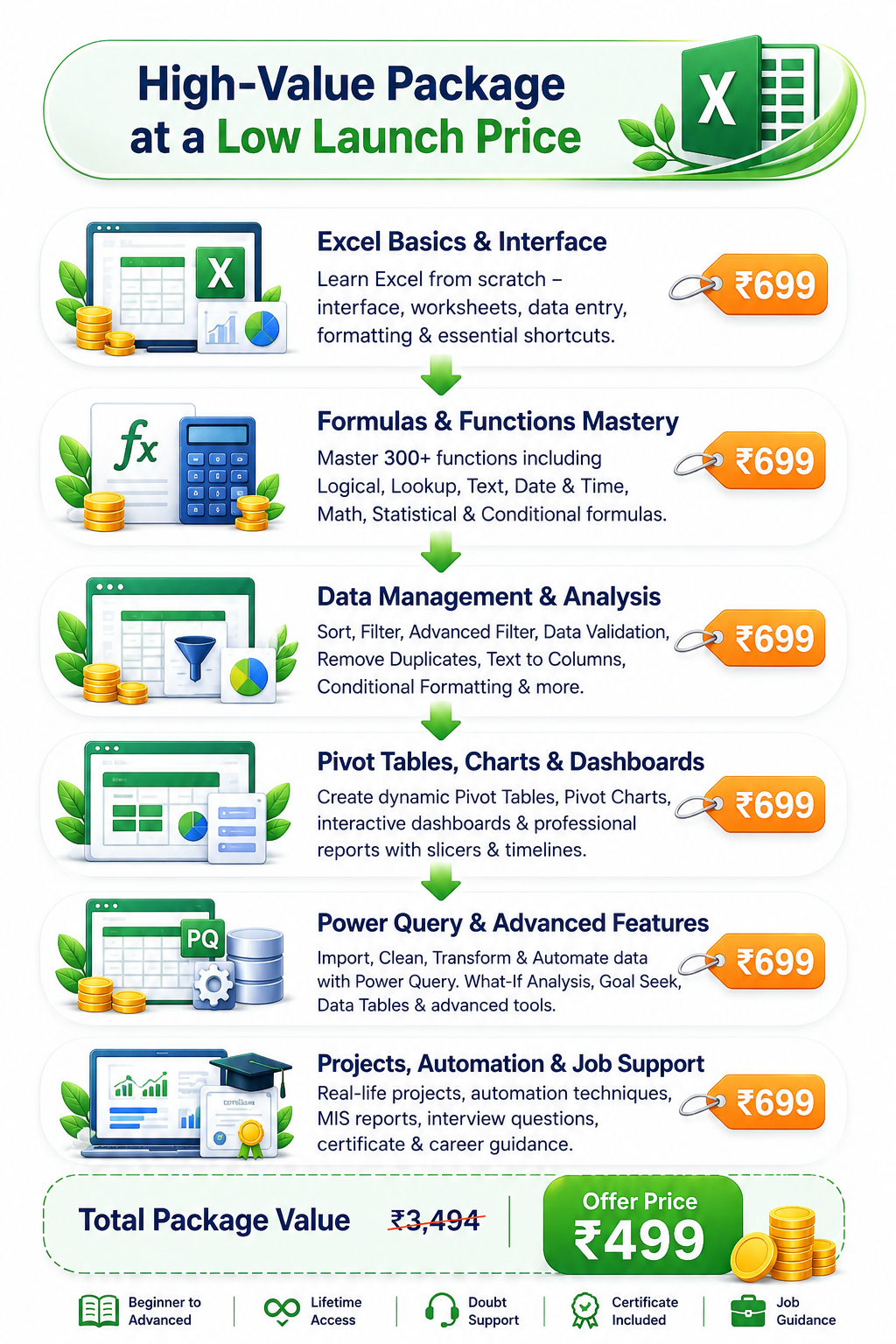
Complete Advanced Excel Practical Program at a one-time Technical & Learning Infrastructure Fee of ₹499.
CERTIFICATE PREVIEW
Get a professional completion certificate after successfully finishing the Advanced Excel Practical Program.
WHAT YOU WILL LEARN
19 Modules - Complete Practical Advanced Excel Training
Module 1 - Excel Fundamentals Understand the Excel interface, workbook structure, data entry flow, and core navigation basics.
Excel Interface & Workbook Worksheets, Rows, Columns & Cells Data Entry & Editing Cell Selection & Navigation Cut, Copy & Paste Paste Special Insert/Delete Rows & Columns Basic Excel Shortcuts Module 2 - Professional Formatting Create polished sheets and reports with professional formatting standards.
Font & Cell Formatting Number Formatting Currency & Percentage Date & Time Formatting Alignment & Text Control Borders & Cell Styles Format Painter Custom Number Formats Professional Report Formatting Module 3 - Formulas & Cell References Build a strong formula foundation with references, calculation order, and auditing.
Formula Basics Mathematical Operators Order of Calculation Relative Reference Absolute Reference Mixed Reference Cross-Sheet References Formula Auditing Common Formula Errors Module 4 - Mathematical & Statistical Functions Use the core functions needed for practical business calculations and summaries.
SUM SUMIF / SUMIFS COUNT / COUNTA / COUNTBLANK COUNTIF / COUNTIFS AVERAGE AVERAGEIF / AVERAGEIFS MIN / MAX ROUND / ROUNDUP / ROUNDDOWN SUBTOTAL AGGREGATE Module 5 - Logical Functions Learn how to create decision-based formulas with single and multiple conditions.
IF Function Nested IF IFS AND OR NOT IFERROR IFNA ISBLANK ISNUMBER / ISTEXT Multiple Condition Formulas Module 6 - Lookup & Reference Functions Master lookups and reference formulas used in modern Excel reporting.
VLOOKUP HLOOKUP XLOOKUP MATCH INDEX INDEX + MATCH XMATCH CHOOSE ROW / COLUMN Multiple Criteria Lookup Advanced Lookup Techniques Module 7 - Text Functions & Data Cleaning Clean raw text and extract useful information using text functions.
LEFT / RIGHT / MID LEN TRIM CLEAN UPPER / LOWER / PROPER FIND / SEARCH SUBSTITUTE / REPLACE CONCAT TEXTJOIN TEXT / VALUE Extracting Information from Text Module 8 - Date & Time Functions Work with dates, durations, schedules, and business day calculations.
TODAY NOW DATE DAY / MONTH / YEAR DAYS DATEDIF EDATE EOMONTH WEEKDAY / WEEKNUM WORKDAY NETWORKDAYS HOUR / MINUTE / SECOND Age & Working-Day Calculations Module 9 - Sorting, Filtering & Excel Tables Organize data efficiently with sorting, filters, and table-based workflows.
Basic Sorting Multi-Level Sorting Basic Filters Custom Filters Advanced Filter Filter by Text/Number/Date Excel Tables Structured References Table Formatting Remove Duplicates Slicers Module 10 - Data Validation & Conditional Formatting Control data entry and visually highlight meaningful patterns in worksheets.
Drop-Down Lists Data Validation Rules Input Messages Error Alerts Duplicate Identification Highlight Cell Rules Top/Bottom Rules Data Bars Icon Sets Formula-Based Conditional Formatting Module 11 - Data Cleaning & Management Prepare raw data for analysis with structured cleaning and standardization steps.
Find & Replace Remove Duplicates Text to Columns Flash Fill Blank Cell Handling Error Handling Removing Extra Spaces Standardizing Data Cleaning Imported Data Preparing Raw Data for Analysis Module 12 - Charts & Data Visualization Present data clearly with charts, sparklines, and professional visual formatting.
Column Chart Bar Chart Line Chart Pie & Doughnut Chart Area Chart Scatter Chart Combo Chart Histogram Sparklines Chart Formatting Dynamic Charts Professional Data Presentation Module 13 - Pivot Table & Pivot Chart Summarize, group, filter, and present large datasets interactively.
Creating Pivot Tables Rows, Columns, Values & Filters Value Field Settings Sorting & Filtering Grouping Data Calculated Fields Pivot Charts Slicers Timelines Refreshing Pivot Tables Interactive Reports Module 14 - Dynamic Array Functions Use modern dynamic formulas to build flexible and spill-based reports.
FILTER SORT SORTBY UNIQUE SEQUENCE Dynamic Arrays Spill Range Combining Dynamic Functions Dynamic Reports Module 15 - Power Query in Excel Import, transform, and refresh data using Power Query workflows.
Power Query Introduction Importing Data Excel & CSV Connections Data Type Management Remove/Rename Columns Split & Merge Columns Replace Values Filtering Data Append Queries Merge Queries Group By Unpivot Data Data Transformation Refreshable Data Cleaning Module 16 - Advanced Data Analysis Analyze scenarios, trends, and business data using Excel's advanced tools.
What-If Analysis Goal Seek Scenario Manager Data Tables Subtotals Data Consolidation Advanced Filters Trend Analysis Business Data Analysis MIS Analysis Module 17 - Excel Dashboard & MIS Reporting Build interactive dashboards and monthly MIS reports with KPI-driven structure.
Dashboard Planning KPI Identification Pivot-Based Dashboard Charts & Slicers Dynamic Reports Interactive MIS Sales Dashboard Performance Dashboard Monthly MIS Reporting Professional Dashboard Design Module 18 - Excel Automation & Practical Projects Practice applied work through automation concepts and real-world Excel projects.
Repetitive Task Automation Concepts Automated Reporting Dynamic MIS Reports Data Cleaning Project Lookup-Based Project Pivot Table Project MIS Reporting Project Interactive Dashboard Project Real-World Business Data Practice Module 19 - Excel Interview & Job Preparation Prepare for Excel tests, interview questions, and role-based practical expectations.
Important Excel Interview Questions Formula-Based Questions IF & Logical Questions VLOOKUP/XLOOKUP Questions INDEX-MATCH Questions Pivot Table Questions Data Cleaning Tasks MIS Reporting Questions Practical Excel Test Preparation
0
Students Trained
0
Expert Courses
0
Guided Learning
3-Level
Support System
Excel Basics -> Formulas -> Logical Functions -> Lookups -> Text & Date Functions -> Data Management -> Advanced Functions -> Pivot Tables -> Power Query -> MIS -> Dashboards -> Automation -> Job Preparation
Who Can Join?
Beginner Friendly
Anyone who wants to build Excel skills for office work, reporting, analysis, or business
Student Video Testimonials
Hear directly from our Excel learners.
Watch real students share their learning experience with Mapari Education.
Student Review 1
Student Review 2
Student Review 3
Student Review 4
Tap to unmute
Job Roles You Can Prepare For
Job Roles You Can Prepare For
Package Range Min 3 lakh to 7 lakh
MIS Executive
Data Analyst
Reporting Executive
MIS Executive
Excel Operator
Back Office Executive
Operations Executive
Sales Coordinator
Dashboard Executive
Business Analyst
Admin Executive
Office Executive
Min ₹3 LPA
Max ₹7 LPA
Documentation Executive
Placement & Career Support
Support beyond classes helps this page convert better.
Students are more likely to enroll when they see a clear path from learning to applying for roles.
Resume Building
Present your Excel, reporting, dashboard, and data analysis skills in a professional resume.
Interview Preparation
Practice likely formula, lookup, Pivot Table, MIS, dashboard, and HR questions with better confidence.
Job Portal Access
Get connected with Mapari’s job-focused support flow for role discovery and opportunities.
Career Guidance
Understand job roles, salary expectations, office workflows, and practical Excel opportunities.
Explore Job Opportunities on Job Portal
Discover relevant openings and take the next step toward your career.
Explore Job Portal
Our Placement Records
Real students. Real opportunities. Real career growth.
Excel Fundamentals + Formatting
Basics and professional worksheet setup
₹1,500
Formulas + Logic + Lookups
Core working formulas for office tasks
₹1,250
Pivot Tables + Power Query
Analysis, transformation, and reporting
₹1,250
MIS + Dashboards + Interview Prep
Projects, reporting, and job preparation
₹1,000
One-Time Package Fee
₹499
Technical & Learning Infrastructure Fee
FAQ
Frequently Asked Questions
Everything you need to know before joining the Advanced Excel Practical Program.
Can a complete beginner join this course?
Yes. The learning path starts from Excel fundamentals and is designed for beginners as well as working learners.
What topics are covered in this course?
The course covers Excel basics, formatting, formulas, logical functions, lookups, text and date functions, data management, charts, Pivot Tables, dynamic arrays, Power Query, MIS reporting, dashboards, automation concepts, projects, and interview preparation.
Is there certificate and placement support?
Students receive a completion certificate after successfully completing the applicable course requirements.
How do I access the classes after enrollment?
The course includes recorded learning content along with applicable live training, doubt-solving, and learning support sessions as scheduled by Mapari Education.
Is ₹499 a one-time payment for the complete package?
Yes. ₹499 is the one-time Technical & Learning Infrastructure Fee for the complete Advanced Excel Practical Program. There are no recurring course-access charges for the included learning content.
Will I receive lifetime course access?
Yes. Students receive lifetime access to the included recorded lessons and learning materials, subject to the platform's applicable terms and policies.
Are both live and recorded classes included?
The course includes recorded learning content along with applicable live training, doubt-solving, and learning support sessions as scheduled by Mapari Education.
Will I get practical assignments and working files?
Yes. Students receive practical assignments, downloadable notes, Excel practice files, case studies, and industry-oriented activities.
Can I study using a mobile phone or laptop?
Yes. Course access is designed for both mobile and laptop. A laptop is recommended for completing Excel practice, Power Query work, and dashboard exercises.
Which job roles can I prepare for after this course?
The training supports preparation for roles such as MIS Executive, Reporting Executive, Data Analyst, Back Office Executive, Office Executive, and dashboard-focused support roles.
Does placement assistance guarantee a job?
Placement assistance does not guarantee a job. Support includes resume guidance, interview preparation, career support, and job portal access. Final selection depends on the employer, available openings, eligibility, and the learner's performance.
Connect with Mapari Team on WhatsApp
Get quick support for enrollment, package details, and learning guidance.
Connect on WhatsApp



 Placement & Career Support